Export Changes to HRIS Workflow
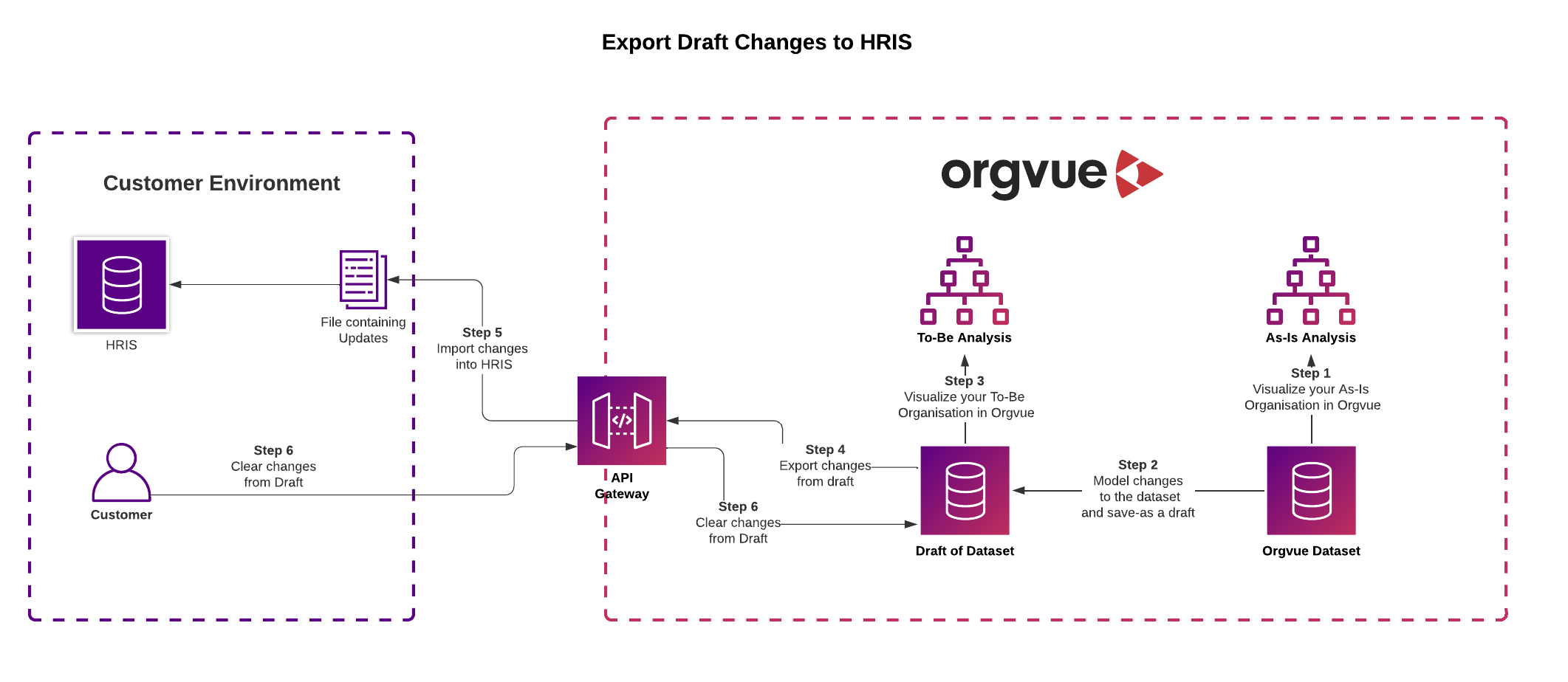
This workflow will guide you through modelling changes in an Orgvue Draft, exporting those changes back to your HRIS and then clearing the draft in the following steps
- Visualize and analyze your As-Is organization in Orgvue
- Model changes to the As-Is organization and save the changes as a Draft in Orgvue
- Visualize and analyze your To-Be organization in Orgvue
- Export changes from the Draft via the API
- Transform and Import the changes back into the source HRIS using your preferred middleware
- Clear the changes from the Draft
Flowchart
Prerequisites to integrating
- You will need access to an Orgvue tenant and the permission to use tokens for that API user (See User Management in Settings for more information)
- Dataset created in Orgvue
- All properties pre-configured in the dataset
- Draft created
- Authentication Token created and stored
- Base URL
- via tenant listing page
- Dataset ID via or the "List datasets" endpoint
- Draft ID via the "List drafts" endpoint
1. Visualize and analyze your As-Is organization
Using the power of Orgvue, visualize and analyze the size and complexity of your current As-Is organization using one of the many supplied
2. Model changes in a draft
Plan and model potential organizational scenarios in Orgvue without amending the baseline data using a
3. Visualize and analyze your To-Be organization
See the impact of the modelled changes by visualizing and analyzing the To-Be organization in Orgvue
Repeat steps 2 & 3 as required to achieve a set of approved changes that you wish to apply to your HR system
4. Export the Draft Changes via the API
Using the POST: https://{baseUrl}/api/v1/{tenantId}/drafts/actions API to export a list of item actions from the Draft to the specified result location URL
The JSON Payload for the request has the following format
{
  "layers": [
    {
      "draftId": "36A1E02D-DC20-61C5-A11F-DD85440C652C",
      "layerKey": "default"
    }
  ]
}
The result location will either be an Orgvue generated secure file, or you may supply your own hosted BYOS3 location as an optional object in the request body and Orgvue can write to that
Defining an optional Callback URL in the payload will enable the API to notify you when processing is complete
5. Import changes back to the source HRIS
Transform the exported changes into a changes import file in the correct format for your source HRIS using your preferred middleware
Import and apply those changes to reflect the modelled To-Be organization in your HR Information System
6. Clear the Draft
Exporting the draft does not clear its contents. So now that you have applied the changes to your HRIS and re-synced the Orgvue Dataset it is time to clear the previous changes from the draft so that it can be used again for further modelling
To clear the contents of a Draft use POST: https://{baseUrl}/api/v1/{tenantId}/drafts/clear
The format for the Clear Draft JSON payload is
{
  "layers": [
    {
      "draftId": "36A1E02D-DC20-61C5-A11F-DD85440C652C",
      "layerKey": "default"
    }
  ]
}