The Henshaw AI Assistant: FAQs
This page answers the most common questions about using Henshaw Assistant.
It explains what Henshaw can do, how to use it safely, and where to go for help or to share feedback.
Whether you’re getting started or exploring more advanced queries, this guide will help you feel confident using Henshaw and understanding its role in your analysis.
General
What is Artificial Intelligence (AI)?
AI refers to advanced artificial intelligence that can generate content, predictions, or recommendations based on the data it has been trained on.
At Orgvue, we have named all of our AI products, “Henshaw”. Named after George Holt Henshaw, the draftsman who created the first recorded organizational chart in 1855 for the New York and Erie Railroad. Henshaw embodies the spirit of innovation and efficiency that Orgvue is famous for.
Is Orgvue integrating Henshaw into its Platform?
At Orgvue, we have always led the way organizations use technology for data-driven organization design and workforce planning and it is no different with AI. We are revolutionizing the way organizations manage and visualize their structures with our cutting-edge AI technology, under the Henshaw name. Orgvue’s suite of AI features have been specifically designed to enhance, accelerate and simplify organizational design and planning processes by giving you tools that remove the heavy lifting and deliver best practice intelligence at the press of a button.
How does Henshaw enhance the capabilities of Orgvue’s Platform?
Henshaw enhances the Orgvue platform by using AI to help users make faster, more accurate organization design decisions, powered by better data, clearer insights and reduced complexity.
Which contractual legal terms govern use of Henshaw?
On a general level, your use of Orgvue Platform is governed by our standard MSA or the agreed terms between us.
As Henshaw comprises a distinct set of features within our Platform, we have introduced a Henshaw Addendum as part of the MSA, as well as a Henshaw Policy. Together these contain relevant terms and conditions specific to the use of Henshaw on the Orgvue Platform.
Who owns the rights to the content created or generated using Henshaw?
As between Orgvue and Customer, you own the prompts and results put into and derived from Henshaw. However, results may not be unique, and the same or similar result may be provided to other users and customers and as such could inadvertently infringe upon third party intellectual property rights. Further, results may not qualify for intellectual property protection and you should make yourself comfortable with use of such results.
How are these inputs/outputs protected?
The prompts and results put into Henshaw are considered Customer Data under the MSA. Accordingly, the security measures and other Orgvue obligations in the MSA will apply equally to these inputs/outputs.
Does Henshaw include features powered by third party AI models?
Yes, Henshaw includes features powered by third party AI models, where such third party acts as a Sub Processor of Customer Data under the DPA.
What does it mean to use the Henshaw Assistant during an Early Access testing phase?
The Henshaw Assistant has been made available initially for early access testing. This offers Customers the opportunity to explore innovative features at no cost. If we decide to make these features generally available, we may introduce fees for their continued use, but only after providing reasonable notice and on mutual agreement in writing. As with all Henshaw features, Early Access Henshaw features are provided 'as is' with no warranty or liability. While we hope you enjoy exploring these innovative features, please note that they may be suspended or removed at our discretion. We strive to continually improve and may make changes based on your feedback, but we cannot guarantee any final product releases.
Will Orgvue (or third party AI model providers) use our inputs/outputs to train its models or otherwise store them?
No, neither Orgvue nor its third party AI model providers will use your Inputs/Outputs for their own purposes, meaning we don’t use prompts or results to train models (and for sake of clarity, no other customer data is used to train the models). For additional comfort to you, Orgvue is committed to ensuring that our third-party providers adhere to this same policy. Orgvue and such third party providers may only use your Customer Data to provide its services to you and will process the Customer Data temporarily for such purpose.
How does Orgvue ensure responsible governance of its Henshaw Products?
Orgvue is deeply committed to the responsible and safe use of its Henshaw Services. To uphold this commitment, we conduct thorough AI Impact Assessments which involve comprehensive risk and impact analyses for all products integrating AI. These assessments meticulously evaluate potential risks and impacts of AI integration, enabling us to devise and implement effective mitigation strategies for any identified concerns. We also have a cross-functional AI Governance Board to oversee responsible AI use within our organization.
Getting Started with the Assistant
How do I access the Henshaw Assistant?
The Henshaw Assistant can be accessed whilst you are working in any pack in Workspace via the button in the navigation:
Can I use it on all datasets?
Yes! The Henshaw Assistant will be able to answer questions about any dataset in your tenant that you have open in a pack. It will only be able to answer questions about the dataset you are viewing, however.
Who should I contact for issues?
If you have any issues with the Henshaw Assistant, please contact support@orgvue.com or you Customer Success Manager.
How does the Henshaw Assistant work?
Henshaw Assistant helps you explore and understand your workforce data through natural language queries: you simply ask a question, and it generates an analytical response directly within Orgvue.
Here’s how it works step-by-step:
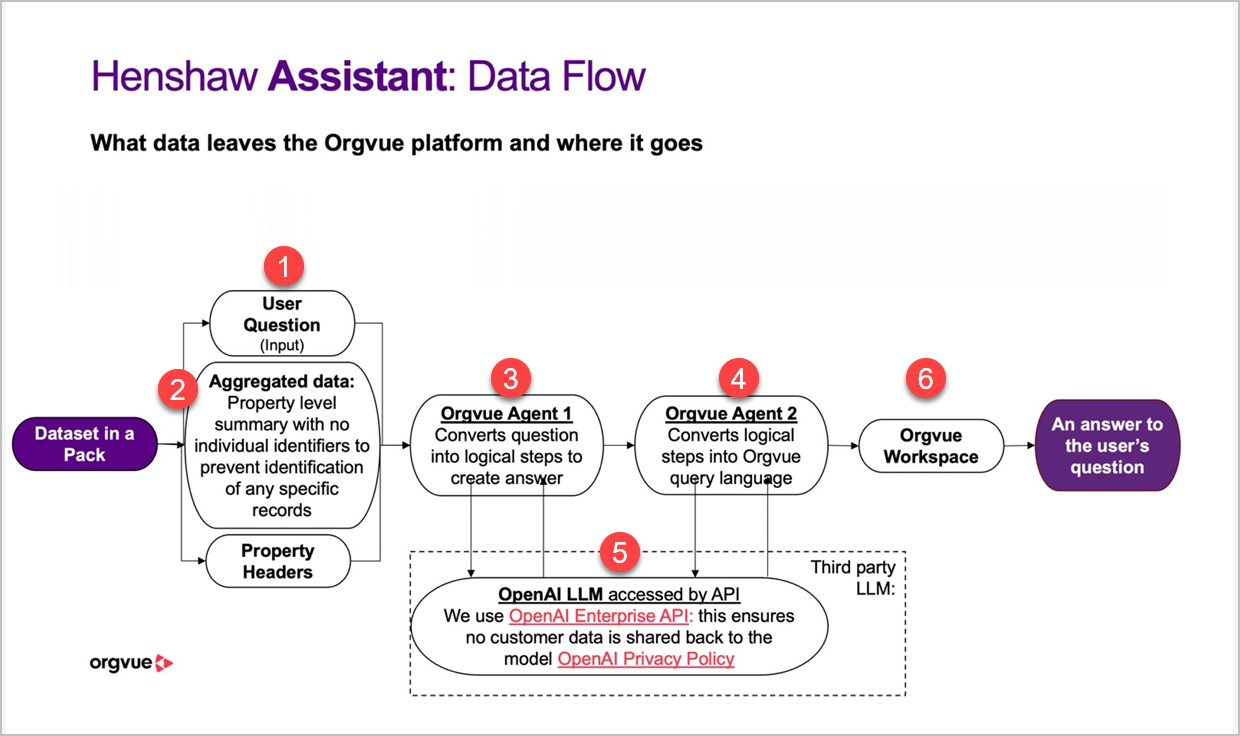
- You ask a question about your dataset in Orgvue (for example, “What are the top three departments by headcount change this year?”).
- Aggregated, non-identifiable data is prepared — only property-level summaries (like totals, averages, or categories) are used. No individual or identifiable records are ever sent outside Orgvue.
- Orgvue Agent 1 converts your question into logical steps that can be used to generate an answer.
- Orgvue Agent 2 then turns those steps into Orgvue’s query language (PQL).
- Both agents interact securely with the OpenAI Enterprise API, which interprets the question and helps generate the most relevant steps. Importantly, no customer data is shared back to OpenAI — data privacy and protection are fully maintained.
- The query runs inside your Orgvue Workspace, producing an answer to your question using your own data.
In short: Henshaw interprets your question, converts it into structured queries behind the scenes, and returns accurate, data-driven insights; all while keeping your data private and secure within Orgvue.
What is PQL?
PQL (Property Query Language) is Orgvue’s internal query language used to retrieve and analyze data within the platform.
It allows Henshaw to translate your natural language questions into precise analytical instructions.
For example, when you ask, “Show me the average span of control by department,” Henshaw converts that question into PQL so Orgvue can run the right calculation on your dataset. In essence, PQL is what connects your question to your data, enabling Henshaw Assistant to deliver accurate, meaningful answers without you needing to know or write any code.
Capabilities & Limitations
What types of questions can Henshaw answer?
Henshaw Assistant is designed to answer questions related to data analysis within Orgvue.
You can use it to explore, summarize, and interpret your workforce data, for example: • “Which departments have grown most in headcount over the past year?” • “Show me the average span of control by manager level.” • “Summarize the distribution of grades across business units.” It works best with quantitative and categorical questions that can be answered from structured data in your Orgvue pack.
A fuller set of best practice prompts can be found on Henshaw Prompting Guide & Best Practices
Can it analyze multiple datasets at once?
During Early Access, Henshaw can only analyze one dataset (pack) at a time. You can, however, ask multiple questions about that dataset in sequence, refining your query or exploring related insights conversationally. Support for multi-dataset analysis may be explored in future phases.
Does it store or learn from my queries?
No, Henshaw does not store or learn from your individual queries. It uses the OpenAI Enterprise API, which ensures that your data and queries are not used to train any external AI models. All processing happens securely within Orgvue, using aggregated, non-identifiable data to protect confidentiality.
Does Henshaw have access to all of my Orgvue data?
No. Henshaw only accesses the dataset (pack) you have open when you ask a question. It cannot view or analyze data outside that pack, and it only uses property-level summaries rather than identifiable records.
Can Henshaw make changes to my data?
No. Henshaw is a read-only assistant during Early Access. It helps you explore and interpret your data, but it cannot edit, delete, or create records in your Orgvue workspace.
Can I ask Henshaw non-data questions?
No. The Early Access version is focused specifically on data analysis tasks such as identifying trends, summarizing patterns, or generating insights. It will not respond to general or administrative questions unrelated to data in your Orgvue pack.
How accurate are Henshaw’s answers?
Henshaw aims to achieve 70% or higher query accuracy during Early Access. You can help improve this by providing clear, specific questions and rating responses in-app (on a 1–5 scale, with optional comments) to share where the results met or missed your expectations.
What should I do if Henshaw’s answer seems wrong or incomplete?
You can: • Open the Gizmo Editor to check the PQL code it has run. Send this to support@orgvue.com if you are unsure if it is correct • Rephrase your question to be more specific or focused • Use your in-app feedback (rating and comments) to explain what didn’t work • Refer back to your dataset or Orgvue visualizations to validate the insight
Answers provided by Henshaw in the assistant side panel are evaluated pre filter whilst the results shown within the Gizmo editor will be evaluated after any filters are applied to the data. Therefore there may be a difference in answers if any filters are in place.
Early Access Program
What is the goal of the Early Access program?
The Early Access program is designed to validate the Henshaw Assistant’s ability to help users analyze workforce data accurately and efficiently. We’re collecting structured feedback to understand how you use it in real analytical workflows, where it saves time, and what could be improved before wider release.
What will I gain from taking part?
As an Early Access user, you’ll be among the first to explore Henshaw’s capabilities and help shape its future. You’ll gain early access to an AI-powered assistant that simplifies data exploration and supports real-time insights into your workforce structure and trends. You’ll also have direct input into product improvements before general release.
What do you need from me?
We ask that you use Henshaw Assistant as part of your regular analysis work and share your honest feedback directly in the app. After each interaction, you’ll be able to rate your experience on a scale of 1 to 5 and optionally add comments to explain what worked well or what could be better. You may also be invited to short feedback sessions where we discuss insights and common themes.
How long does the Early Access period last?
The Early Access phase runs from November to January, leading up to the General Availability (GA) release. After GA, all existing Early Access customers will continue to have access unless they choose to opt out.
How many users are participating?
We’re working with a focused group of around 20–25 customers, with two users per customer organization. This allows us to collect detailed, high-quality feedback and provide a more personalized experience.
What kind of feedback are you looking for?
We’re interested in how you use the Assistant in your everyday analysis, where it saves time or simplifies tasks, and what challenges or gaps you encounter. We also want to hear about valuable use cases that clearly demonstrate the Assistant’s benefit. Both your in-app ratings and free-text comments will help guide these improvements.
How will success be measured?
We’ll consider the Early Access phase successful if Henshaw achieves 70%+ query accuracy, more than 60% of participants report being satisfied or very satisfied with the experience, and the supporting documentation is clear and complete for all users.
Why does this testing phase matter?
Early Access ensures Henshaw is validated with real users before being rolled out more broadly. It helps confirm that the Assistant provides consistent, repeatable value over time, not just early excitement. Your feedback will help shape the roadmap and ensure Henshaw becomes a reliable, everyday tool for data exploration and insight.
Accuracy & Reliability
What is the current accuracy rate?
During the Early Access phase, Henshaw aims to achieve around 70% query accuracy. This means that in most cases, it will return a relevant and correct response to your data question. However, because Henshaw is in an early stage of development, you may occasionally receive incomplete or imprecise results. Your feedback is key to helping us improve accuracy before general release.
Why might Henshaw’s answer be incorrect or incomplete?
Henshaw generates results based on how your question is phrased and how the underlying data is structured. If the question is too broad or ambiguous, the Assistant might misinterpret your intent or select the wrong data properties. Accuracy can also vary depending on data quality, naming conventions, or missing values within your dataset.
Answers provided by Henshaw in the assistant side panel are evaluated pre filter whilst the results shown within the Gizmo editor will be evaluated after any filters are applied to the data
What should I do if an answer seems wrong?
If you believe a response is incorrect: • Check the PQL query generated by opening the Gizmo Editor to understand how Henshaw interpreted your question. • Rephrase your question to be more specific (for example, specify a time period or group). • Rate the response in-app using the 1–5 scale and add a comment describing what went wrong — this helps our team refine the model. • If the issue persists, you can email support@orgvue.com with the PQL code and a short description.
How does my feedback improve accuracy?
Every in-app rating and written comment is reviewed by the Orgvue product and data teams. Your input helps us identify common patterns in where the Assistant performs well and where it struggles. This enables us to refine its prompts, strengthen model guidance, and improve reliability over time. In short, the more you use and rate Henshaw, the smarter and more accurate it becomes for everyone — all without storing or learning from your actual data.
Does accuracy vary between different types of questions?
Yes. Henshaw performs best on clear, quantitative queries (for example, totals, averages, or comparisons). It may be less accurate with complex, multi-condition questions or those that mix unrelated data types. Future updates will continue improving this capability.
Feedback & Next Steps
How often should I share feedback?
You can share feedback as often as you like, directly within the app after each question. Each rating and comment is valuable. In addition, we may invite you to short feedback sessions (around one hour every two weeks) to discuss your experience in more detail. Consistent input helps us identify trends and prioritize improvements faster.
What type of feedback is most helpful?
The most useful feedback explains why a response worked well or fell short. For example: • “The summary was accurate but missed one key category.” • “The calculation used the wrong time period.” • “The visualization matched exactly what I needed.” Specific, example-based comments are far more valuable than general ratings alone.
Will my access continue after Early Access ends?
Yes. Once the Early Access phase concludes, you’ll continue to have access to Henshaw as part of the platform unless you choose to opt out. Any new features or changes introduced after this period will be communicated in advance.
How will I know when updates are made?
Orgvue will share updates on improvements, new features, or documentation changes through your Customer Success Manager and via in-app notifications. You’ll always have access to the latest version of supporting guides and release notes.
How can I become a product advocate?
If you find Henshaw valuable and want to share your experience, let your Customer Success Manager know. We’re building a group of early adopters who will contribute to future design sessions, customer stories, and advocacy programs. Advocates will get early visibility of new features and direct input into future releases.
What happens after Early Access concludes?
At the end of the program, Orgvue will review all participant feedback, measure results against success metrics (accuracy, satisfaction, and usage), and determine next steps for general availability. Your experience and comments will directly shape product priorities and future roadmap decisions.